

A Claude AI Skill for Financial Modeling
A Claude AI skill that creates 13-sheet integrated financial models with DCF valuation. Free to download.
Last month, an equity research analyst reached out with an unusual request.
Unusual because of who he was. Two decades of building financial models. Covered sectors across the market. Trained junior analysts. The kind of analyst who can spot red flags in a balance sheet before the auditors do.
Yet here he was, asking about AI.
Not skeptically. More like someone who’d been watching from the sidelines and finally decided to step onto the field.
“I’ve built thousands of models,” he said. “I know how to do this. But I don’t want to spend six hours on what should take one. I don’t want to chase formula errors at midnight anymore.”
Then he said something that stuck with me.
“Building the model isn’t the hard part. Anyone can learn that in thirty days. The hard part is knowing what questions to ask once it’s built. That’s where twenty years shows up. That’s what I should be spending my time on.”
He was right.
Extracting numbers, linking formulas, debugging why the balance sheet doesn’t balance, none of that is analysis. It’s administration. The real work starts after the model is built.
So I built him something. A system that creates 13-sheet integrated financial models with three-statement flows and DCF valuation. Tested it. Fixed the gaps. Refined it until it worked the way a model built by a serious analyst would work.
And now I’m giving it away.
Not the exact version customized for him. But the core framework, packaged as a Claude Skill you can deploy in under few minutes.
This newsletter documents everything: how the skill works, how to set it up, and what changes when you can build models in an hour instead of six.
Let’s begin.
What This Skill Actually Does
Before we get into setup, let me show you what you’re getting.
The Integrated Financial Modeling Skill creates a complete 13-sheet Excel model with:
Core Financial Statements (Sheets 1-5)
Introduction: Company overview, key metrics, current valuation
Consolidated P&L: Profit & Loss with projections
Consolidated Balance Sheet: Always balances
Consolidated Cash Flow Statement: Always reconciles
Reconciliation: Cash validation check
Analysis Sheets (Sheets 6-8)
Ratio Analysis: 30+ financial ratios across all periods
Common Size P&L: Vertical analysis (% of revenue)
Common Size BS: Vertical analysis (% of assets)
Supporting Schedules (Sheets 9-11)
Revenue Model: Bottom-up revenue build from drivers
Quarterly Data: Latest quarters for tracking
Capex Model: Fixed assets and depreciation schedule
Valuation (Sheets 12-13)
DCF Valuation: Three methods: Gordon Growth, FCFE, FCFF with sensitivity tables
Scenarios: Bear/Base/Bull cases
Everything is formula-driven. Historical years pull from annual reports. Projection years are 100% formulas linked to assumptions. Change one input, and the entire model updates, P&L flows to Balance Sheet, Balance Sheet changes drive Cash Flow, Cash Flow reconciles back.
No hardcoding. No broken links. No midnight debugging.
The DCF sheet alone runs three independent valuations and averages them for a final target price. Two sensitivity tables show you how the valuation moves with different discount rates and growth assumptions.
This is the structure institutional analysts use. Now it’s yours.
What You Need Before Starting
This skill runs on Claude, Anthropic’s AI. You’ll need a few things set up before you can use it.
1. Claude Pro Plan
The Skills feature requires Claude Pro. It costs $20/month (roughly ₹1,800).
Go to claude.ai, sign up, and upgrade to Pro from Settings. Without Pro, you won’t have access to Skills or Projects, both of which this system requires.
2. Enable Skills
Once you’re on Pro:
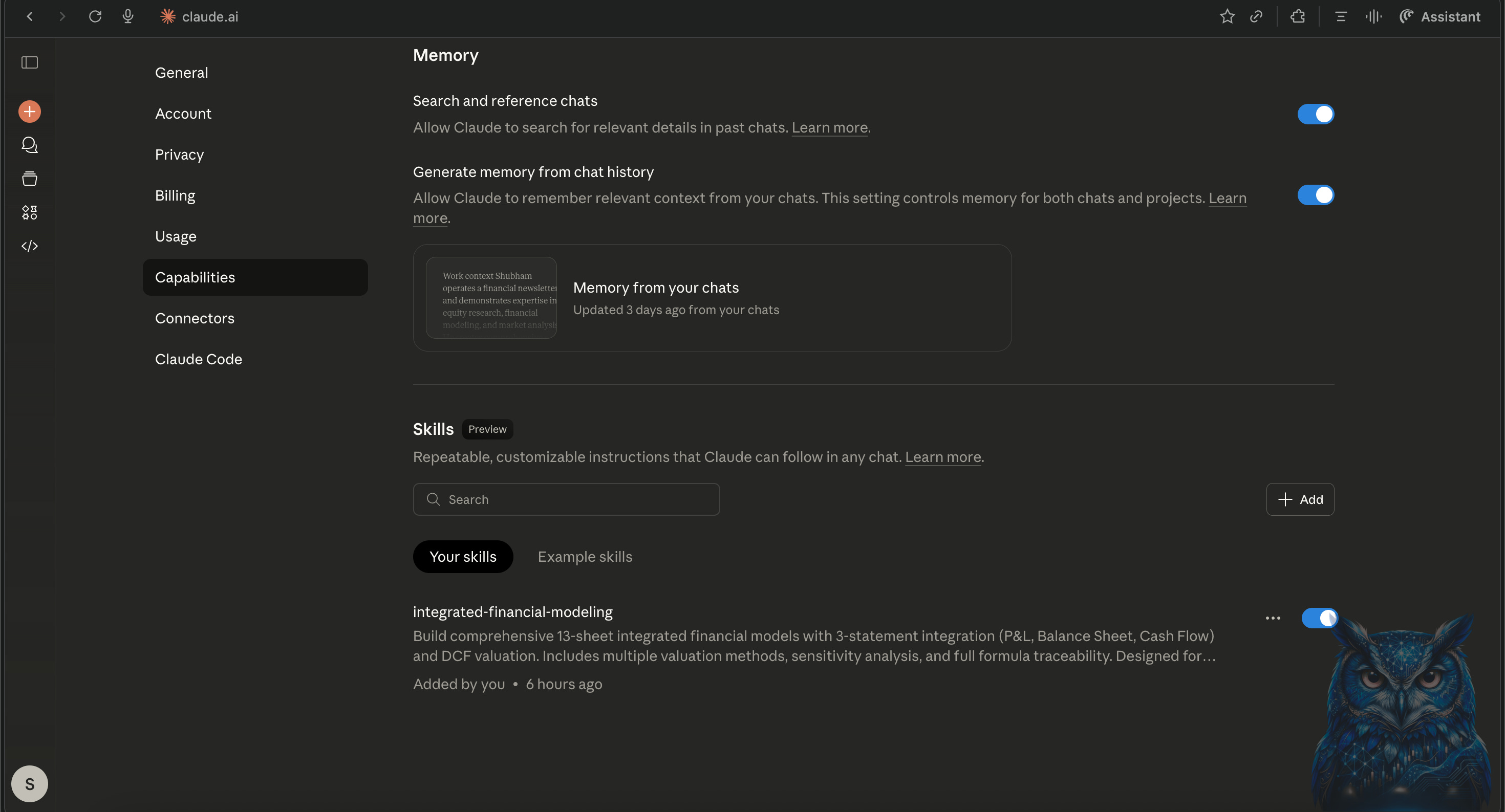
Go to Settings → Capabilities → Skills
Turn on the toggle for Skill Creator (Beta)
This allows Claude to read custom skill files you upload.
3. Download the Skill Package
I’m giving away the complete skill as a zip file. It contains:
SKILL.md: The main instruction file Claude reads
references/: Detailed methodology guides, DCF specifications, prompt templates
examples/: A working template model for reference
Download that .zip file to your computer.
You’ll upload this file in the next step.
Go back to Settings → Capabilities → Skills
Click Upload Skill
Drag and drop the downloaded .zip file into the upload window.
Wait for confirmation, your Skill will now appear under My Skills.
Now you’re ready to generate full financial models, instantly.
One more hack.
Want to use your own in-house template instead of the one provided?
Start a new chat. Upload the skill zip file along with your own Excel model template. Then say:
“I want to follow the structure of this template instead of the current skill template. Update the skill accordingly.”Claude will decode the skill, make the necessary changes to match your template’s structure and formatting, and give you a new zip file. Upload that to your project, and you’re set with a customized skill built around your own standards.
Demo to upload this skill:
4. Financial Data from Perplexity Finance
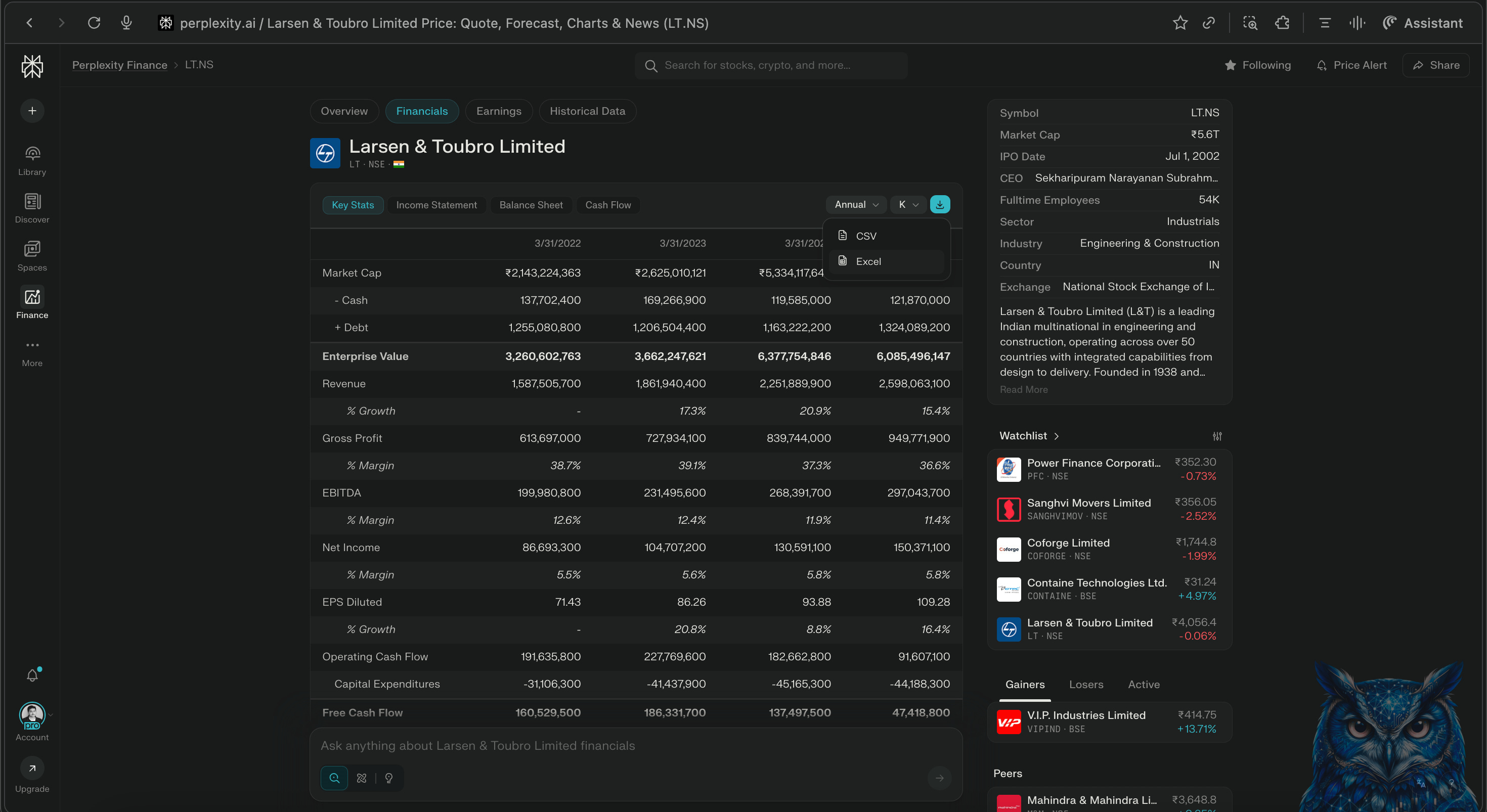
Go to perplexity.ai/finance and search for your company. Download the Excel file, it includes balance sheet, cash flow statement, P&L, and key statistics across multiple years.
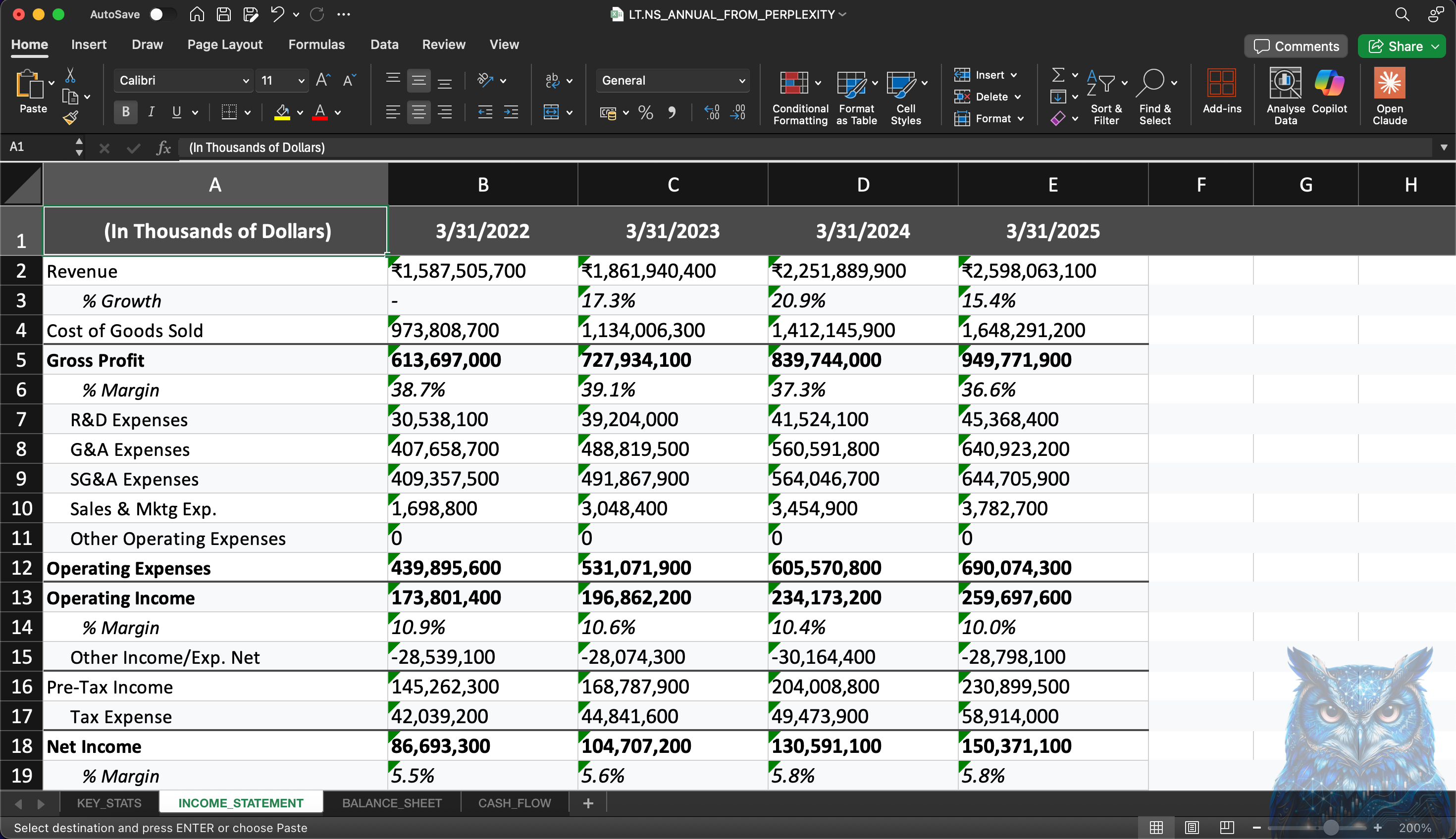
One thing to note for Indian companies: the downloaded Excel sometimes shows the currency unit as “USD” or “Billion USD” at the top, even though all figures are actually in Indian Rupees. Just edit that header to show the correct unit (₹ Crores or ₹ Lakhs) before uploading to Claude.
That’s it. Pro plan, skills enabled, skill package downloaded, financial data ready.
Now let’s set it up.
Setting Up Your Claude Project
The skill package includes a detailed setup guide. Follow it step by step. Once you upload the skill, click on the skill and find the guide in the references section.
Step 1: Create New Project
Go to claude.ai. Click “Projects” in the left sidebar, then “New Project.”
Name: Integrated Financial Modeling
Description: Build 3-statement financial models with DCF valuation for listed companies
Step 2: Upload All Files
Unzip the skill package you downloaded. Upload everything to your project’s Knowledge section:
SKILL.md
All files from the references/ folder
The template from examples/ folder
Step 3: Add Custom Instructions
Open project_setup_guide.md from the references folder. Find the Custom Instructions section (Step 3 in that guide).
Copy the entire instruction block and paste it into your project’s Custom Instructions.
This tells Claude exactly how to build models, what standards to follow, and what quality checks to run.
Step 4: Start Building
Open a new chat inside your project. Upload the Perplexity Finance Excel for your company.
Say:
“Build an integrated financial model for [Company Name] using the uploaded data.”
Claude reads the skill files, extracts your data, and builds the complete 13-sheet model.
What Happens When You Run It
Here’s the important part. Claude will build your model, but it needs your inputs. Otherwise, it makes assumptions on its own and you want control over those assumptions.
Open quick_prompt_templates.md from the references folder. At the top, you’ll find the Master Prompt. This is what you use.
It looks like this:
Fill in the blanks. Current market price, your growth assumptions, margin expectations, working capital days, beta, risk-free rate, all of it. The more you specify, the more the model reflects your view. Leave things blank, and Claude will assume defaults based on historical trends.
Once your inputs are ready, paste the prompt into your project chat along with the Perplexity Finance Excel file.
Claude reads the skill files, extracts the financial data, and builds the model using your assumptions. It populates historical years first, verifies the balance sheet balances, confirms cash flow reconciles, then moves to projections. Finally, it builds the DCF with all three valuation methods, runs sensitivity analysis, and delivers the Excel file.
What used to take six hours is now completely automated.
Edit, Analyze, and Reuse
Once downloaded, the model is completely editable.
You can tweak assumptions, stress-test cases, and rerun new versions, all in minutes, not hours.
But here’s the thing, the first output isn’t always perfect. Formulas might not connect across sheets. Rows and columns might mismatch. Something might not tally.
When that happens, re-upload the Excel file or just ask a follow-up: “The balance sheet isn’t balancing in FY26E. Can you check and fix it?” or “Depreciation in P&L doesn’t match the Capex Model. Please re-link.”
Keep iterating. Ask Claude to re-verify until you get a clean model. You can do this manually too, but Claude speeds up the debugging significantly.
The Skill Package: What’s Inside
Here’s what you get when you download the skill:
integrated-financial-modeling/
├── SKILL.md
├── README.md
├── LICENSE.txt
├── references/
│ ├── financial_modeling_methodology.md
│ ├── enhanced_dcf_specification.md
│ ├── quick_prompt_templates.md
│ └── project_setup_guide.md
└── examples/
└── JK_Paper_Template.xlsx
SKILL.md: The main file Claude reads. Contains the 13-sheet structure, core principles, DCF methods, quality checks.
financial_modeling_methodology.md: The complete 100+ page guide. Every sheet explained. Every formula documented. Projection methodologies. Troubleshooting steps.
enhanced_dcf_specification.md: Detailed DCF structure with all three valuation methods, sensitivity tables, and complete formula references.
quick_prompt_templates.md: Ready-to-use prompts. Master prompt for full models. Stage-by-stage prompts. Troubleshooting prompts.
project_setup_guide.md: Step-by-step setup instructions. Custom instructions to copy-paste. Example conversations.
JK_Paper_Template.xlsx: A working reference model.
Closing
That analyst I mentioned at the start? He’s been using this for two weeks now.
Last I heard, he’d built models for 3 companies. Said he’s spending more time reading management commentary and thinking about business quality than fixing Excel errors.
That was the whole point.
Financial modeling hasn’t changed in thirty years. The same manual extraction. The same formula linking. The same midnight debugging. AI should have fixed this by now.
Now it can.
The skill is free. The setup takes under an hour. The models that come out are institutional-grade, 13 sheets, fully integrated, three DCF methods, sensitivity analysis included.
What you do with the extra time is up to you.
Download the skill. Build your first model. And if you find ways to make it better, I’d love to hear about it.
What’s Coming Next Week
A complete framework to research any industry, in any geography, from scratch using AI.
🤝 Help Us Grow This Circle
Thank you for reading and supporting Alpha with AI. If you share this edition with even one person who might find it valuable, it means the world to us and helps this project reach those who need it most.
Bonus: SuperAnalyst Command Centre
Research doesn’t fail because of bad analysis. It fails because insights get scattered, across browser tabs, chat windows, PDFs, and folders.
That’s why I built the SuperAnalyst Command Centre.
A Notion-based AI research system where:
Perplexity gathers intelligence
NotebookLM analyzes documents
Notion AI connects everything
Every insight stays linked. Ask it a question months later, it remembers.
The Basic Version is free. The Pro Version unlocks the full workflow.
Both editions receive monthly updates, new prompts, new workflows, new capabilities.
Research evolves. Your system should too.
At Shikshan Nivesh, our goal is simple, to make financial research faster, smarter, and more accessible.
Because the future of analysis isn’t about who knows Excel best.
It’s about who builds thinking systems that scale.
Written by Shubham Borkar | Research & Insights by Shikshan Nivesh AI Team
Financial Clarity. Insightful Ideas.
Disclaimer
This Guide & Prompt Kit and its outputs are for educational and research purposes only. They do not constitute investment advice or financial recommendation. Always verify disclosures and consult qualified professionals before making investment or business decisions.
Thank you for being part of the Shikshan Nivesh community.


Can you write a topic how to write a good AI skills. Thanks
Smart approach to automating model building so you can ask better questions. Those questions often lead to operational finance: how do a company's actual payment behaviours and credit terms sustain or strain the cash flow you're projecting? TCLM focuses on making that part of the financial story clear. Worth a look for building more grounded models.
(It’s free)- https://tradecredit.substack.com/