

Claude Now Lives Inside Excel. Here's What That Actually Means.
How I built an institutional-grade LBO prompt without knowing LBO and what that says about where finance is heading.
“Anyone can build an LBO model. The spreadsheet doesn’t care who’s typing. But 90% of the models I’ve reviewed get thrown out in the first 60 seconds.”
That’s what a senior PE analyst told me two weeks ago.
I asked him why.
“Because they test the wrong things. The math is always fine. Excel doesn’t make arithmetic errors. But the assumptions? The debt sizing? The sensitivity variables That’s where you see who actually understands the deal and who just followed a template.”
That conversation is the reason this week’s workflow exists.
But let me back up.
I’m Shubham. I run Alpha with AI, a weekly newsletter where I build AI-powered workflows that replicate what institutional research teams do, and release them for free.
Every week, one workflow. Every workflow challenges an expensive industry standard.
I’ve built tools for earnings analysis, peer comparisons, insider trading detection. But this week, I tried something I’ve never done before.
I built an LBO modeling prompt.
The problem? I don’t build LBO models for a living. I’ve never worked in PE. Never sat across the table defending an IRR to someone with ₹500 Cr on the line.
So I did what any honest builder would do, I went to someone who has.
And what he taught me wasn’t the math.
It was the judgment.
That distinction<math vs. judgment> is the entire point of today’s newsletter.
Why most AI prompts for finance are useless
Here’s what most people do when they want AI to build a financial model:
They open ChatGPT. They type “Build me an LBO model. bla bla bla instructions in next few lines”
They get a clean-looking spreadsheet and they think it worked.
But here’s what actually happened, they got a template.
A structure. Rows and columns that look right. Numbers that don’t embarrass you at first glance. But try stress-testing it. Try changing one assumption and watching what breaks. Try showing it to someone who’s actually closed a leveraged deal.
It falls apart. Not because the math is wrong, but because nobody told the AI what to check. That’s the gap nobody talks about.
The AI can build a model in seconds. But it doesn’t know which assumptions to question. It doesn’t know that a 7x debt/EBITDA on a mid-cap industrial company is insane. It doesn’t know that your sensitivity table is testing variables that don’t actually move the deal.
The senior analyst I spoke to put it simply:
“A good model isn’t the one that runs. It’s the one that tells you when something doesn’t make sense.”
That one line rewired how I built this prompt. Because most AI finance prompts are instructions.
Do this. Calculate that. Format it like this.
This prompt is different. It’s not a set of instructions.
It’s a set of questions.
The 5 things the prompt checks that you wouldn't
Let me show you what this looks like in practice.
You open Excel. Three sheets of financial data, income statement, balance sheet, cash flow. Plus market cap and enterprise value.
You open Claude’s integration. It sits right inside Excel now. No browser tab. No copy-pasting. Just a chat window inside your spreadsheet.
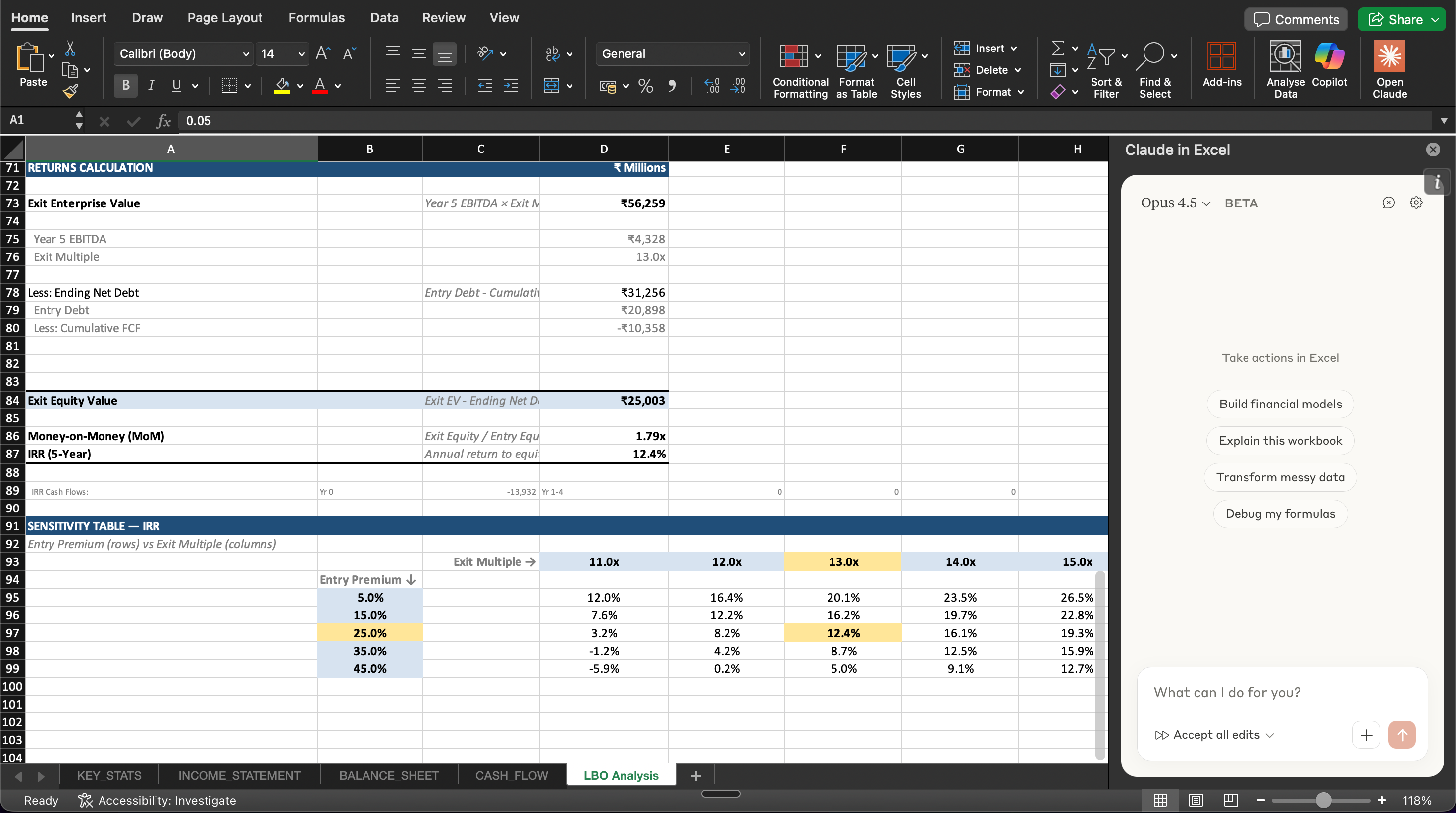
You paste one prompt and then something happens that doesn’t happen with generic AI prompts.
It starts asking the right questions. Not “what font do you want for the header.”
The real questions. The ones that separate a model from a template.
Here’s what I mean:
1. It doesn’t guess your assumptions, it derives them.
Most AI prompts ask you to input assumptions manually.
Or worse, they make them up.
This prompt pulls Capex, D&A, and Net Working Capital ratios directly from your historical data. Three-year averages. Not vibes. Not industry benchmarks from a textbook. YOUR company’s actual numbers.
You can override them. But the starting point is real.
2. It checks if your deal structure makes sense.
Here’s where the analyst’s thinking shows up.
After sizing the debt, the prompt calculates implied Debt/EBITDA and surfaces it right next to your assumptions. Not buried in a formula somewhere.
Right there. Staring at you.
If you’re trying to lever a mid-cap company at 8x EBITDA, the model doesn’t stop you, but it makes sure you see what you’re doing.
That’s the difference between a tool and a teacher.
3. It stress-tests what actually matters.
Most sensitivity tables I’ve seen test variables that look impressive but don’t move the deal.
This prompt builds a 5×5 sensitivity grid around two things that actually determine whether a PE deal works: exit multiple and entry premium.
25 scenarios. Each one recalculates dynamically. Each one tells you something about the deal that a single IRR number never could.
4. It doesn’t hide the math.
Everything is formula-driven. Every output cell references an assumption cell. Nothing is hardcoded.
Change one assumption and watch the entire model ripple. That’s not just a feature, that’s how you learn what drives an LBO.
5. It runs on one tab. Inside Excel. In minutes.
No switching between tools. No exporting CSVs. No debugging Python scripts.
One tab called “LBO Analysis.” Summary box at the top.
Entry Equity, Exit Equity, MoM, IRR, all visible before you scroll.
The model that used to take days now takes a conversation.
But the prompt isn't the most important part.
The Prompt Isn’t the Alpha. This Is.
Here’s what nobody tells you about using AI for financial modeling.
The prompt matters. But it’s not the difference-maker.
The context is.
Before I run this prompt, I add a sheet to the workbook. First sheet. Plain text. No formulas. Just context.
What sector the company operates in. What the competitive landscape looks like. Any thesis I have about revenue growth or margin expansion. What a PE buyer might care about for this specific business.
Why? Because Claude reads every sheet in the workbook before it responds.
So when it suggests a revenue CAGR or an exit multiple, it’s not pulling from generic defaults. It’s reasoning from YOUR context about THIS company. That’s the difference between a model that looks right and a model that thinks right.
The prompt gives Claude structure. The context sheet gives Claude judgment.
Add both. That’s the real workflow.
Watch. Then Judge.
Don’t take my word for it.
Watch.
That’s it. One prompt. One conversation inside Excel.
A full LBO model with institutional logic.
No editing. No manual adjustments. No switching between tools.
Just the raw output from a single prompt.
Now here’s what I want you to sit with for a moment.
I don’t have a PE background. I’ve never built LBO models professionally. I spent a few hours learning from someone who has and turned that conversation into a prompt.
And the prompt works.
Not because I’m special. Not because AI is magic. Because the real skill in finance was never the spreadsheet.
It was knowing what to look for inside the spreadsheet.
The assumptions that don’t make sense. The leverage ratio that’s too aggressive. The sensitivity variables that actually move the deal.
That knowledge used to live in one place, the heads of people who’d done it for 10, 15, 20 years.
Now it lives in a prompt. That’s not a threat to experienced analysts.
It’s a shift in where the value sits. The analyst who taught me didn’t feel threatened.
He was fascinated. Because he realized something:
His 15 years of judgment, the pattern recognition, the instinct for what looks wrong, the questions he asks before anyone else thinks to ask them, that can now be encoded. Shared. Scaled.
The mechanical work? AI handles that.
The judgment? That’s still human. But it’s no longer locked inside one person’s head.
That’s what Alpha with AI is about.
Not replacing analysts. Democratizing the judgment that used to take a decade to develop.
One workflow at a time.
Here’s the full prompt:
You are a senior private equity analyst building an LBO model. Before you begin, read every sheet in this workbook carefully — financial statements, market data, and any
context or investment thesis notes provided.
Your task: Construct a complete Leveraged Buyout analysis based on the historical financial data in this workbook (3 years of income statement, balance sheet, and cash flow statement, plus current market cap and enterprise value).
If a context sheet exists with sector information, competitive positioning, or investment thesis notes — use that to inform your assumption choices and flag anything in the data that contradicts or supports the thesis.
---
## 1. ASSUMPTIONS
### User-Adjustable Assumptions
Recommend starting values based on the company's historical performance, sector context, and current market conditions.
For each assumption, include a brief note explaining your reasoning:
- Purchase premium over current market cap (%)
- Debt / Equity split for acquisition financing (display implied Debt / LTM EBITDA as a sanity check)
- Interest rate on acquisition debt (%)
- Revenue CAGR across the 5-year hold period (%)
- EBITDA margin at exit (% — note whether this assumes expansion or contraction vs. current margin, and why)
- Exit multiple (x LTM EBITDA at Year 5)
### Derived Assumptions (lock from historical data)
Calculate these directly from the financials — do not estimate or assume generic benchmarks:
- Capex as % of revenue → 3-year historical average
- D&A as % of revenue → 3-year historical average
- Net Working Capital as % of revenue → most recent year (NWC = Current Assets excl. Cash − Current Liabilities excl. Debt)
- Tax rate: 21%
- Hold period: 5 years
- Debt repayment structure: bullet repayment at exit (no annual amortization — FCF accumulates as cash on balance sheet throughout the hold)
### Assumption Sanity Check
After setting assumptions, flag any of the following:
- Debt/EBITDA above 6.0x (aggressive for most sectors)
- Exit multiple significantly above entry implied multiple
- Revenue CAGR that deviates sharply from historical trend
- EBITDA margin assumption that contradicts sector dynamics or context provided
---
## 2. SOURCES & USES
Uses:
- Purchase equity value (current market cap × (1 + premium))
- Refinance existing net debt (from balance sheet)
- Transaction fees: 1.5% of enterprise value
- Financing fees: 2.0% of new debt raised
Sources:
- New acquisition debt (sized to target Debt/Equity ratio)
- Sponsor equity contribution (plug to balance)
Verify: Total Sources = Total Uses
Display: Implied Debt / LTM EBITDA from debt quantum
---
## 3. FINANCIAL PROJECTIONS
Layout: 2 historical years + 5 projection years (columns)
Row items:
- Revenue
- Revenue growth (%)
- EBITDA
- EBITDA margin (%)
- Depreciation & Amortization
- EBIT
- Interest expense (Entry Debt × Interest Rate — constant debt balance until exit)
- EBT (Earnings Before Tax)
- Taxes
- Net Income
- Capital Expenditures
- Change in Net Working Capital
- Levered Free Cash Flow (Net Income + D&A − Capex − Change in NWC)
- Cumulative Free Cash Flow
---
## 4. RETURNS ANALYSIS
Calculate:
- Exit Enterprise Value = Year 5 EBITDA × Exit Multiple
- Ending Net Debt = Entry Debt − Cumulative FCF
- Exit Equity Value = Exit EV − Ending Net Debt
- Entry Equity = Sponsor equity from Sources & Uses
- Money-on-Money (MoM) = Exit Equity ÷ Entry Equity
- IRR = 5-year IRR
(Year 0 outflow: Entry Equity → Year 5 inflow:Exit Equity)
---
## 5. SENSITIVITY TABLE
Build a 5×5 grid showing IRR across:
- Columns: Exit Multiple at base case ±1.0x and ±2.0x
- Rows: Entry Premium at base case ±10% and ±20%
Requirements:
- Use direct formulas, not Excel Data Tables
- Each cell must recalculate dynamically
- When entry premium changes, debt quantum adjusts proportionally to maintain the target Debt/Equity ratio
- Highlight the base case cell
---
## 6. DEAL ASSESSMENT
Add a brief commentary section below the sensitivity table:
- Does this deal achieve a minimum 2.0x MoM / 15% IRR at base case?
- What is the margin of safety — how much can exit multiple compress before returns fall below 2.0x?
- What are the 1-2 biggest risks to the return profile based on the numbers?
- If context/thesis was provided: does the model support or challenge the investment thesis?
---
## FORMATTING
- Build everything on a single new tab: "LBO Analysis"
- Each section as a clearly labeled, separated table
- Years in columns, metrics in rows
- Assumption cells: blue font with cell borders (clearly marked as editable inputs)
- Derived/calculated cells: black font (clearly distinguished from inputs)
- Summary box at the very top of the tab showing:
Entry Equity | Exit Equity | MoM | IRR
- All outputs must be formula-driven, referencing assumption cells — no hardcoded values anywhereHow to use it:
1. Open an Excel workbook with 3 years of financials (income statement, balance sheet, cash flow) plus current market cap and enterprise value and most important part, don’t forget to add context in the first sheet itself.
2. Open Claude integration inside Excel (requires Claude Pro: $20/month)
Add in Process:
Navigate to the Claude in Excel listing on Microsoft Marketplace.
Click “Get it now” to install the add-in.
Open Excel, activate the add-in, and sign in with your Claude account.
Claude in Excel accelerates spreadsheet work through intelligent assistance. It reads complex multi-tab workbooks, explains calculations with cell-level citations, and safely updates assumptions while preserving formula dependencies. Create pivot tables and charts to visualize your data, or upload files directly into your workflow.
Whether you're debugging errors, building new models, or modifying existing ones, Claude maintains full transparency by tracking changes and providing clear explanations at every step.3. Paste the prompt
4. Review the output. Adjust the assumptions. Stress-test the sensitivity table.
That last step is the important one. The model gives you answers. Your job is to question them.
That’s how an analyst thinks.
Remember what the analyst said?
“90% of the models I’ve reviewed get thrown out in the first 60 seconds.”
Not because the math was wrong. Because nobody asked the right questions.
This prompt asks the right questions. Not because I figured them out, because someone with 15 years of deal experience told me what they were.
I just made sure AI remembers them every single time.
That’s the bet I’m making with Alpha with AI.
Every week, I find someone who’s spent years building judgment in their field. I learn what they know and I encode it into a workflow that anyone can use.
Not theory. Not courses. Not paywalled research.
Free tools that think like practitioners.
This week it was LBO modeling. Next week it’ll be something else. The library keeps growing.
Now here’s what I want you to do.
Don’t just save this prompt. Run it. Pull up any company’s financials. Paste the prompt. Read the output.
Then question it. Check the assumptions. Push back on the leverage ratio. Ask yourself if the exit multiple makes sense.
That’s not AI replacing your thinking. That’s AI giving you something worth thinking about.
See you next Sunday.
(Launching on 20th Feb)
The SuperAnalyst Mentorship (12-Week Cohort)
The Research Stack I shared today is just one gear in a much larger engine.
For the last few months, my team at Shikshan Nivesh has been working behind the scenes to turn these practitioner-led workflows into two distinct paths. We don’t do theory. We don’t do “guru” lectures. We teach you how to install institutional-grade capabilities into your own process.
We recently launched the Super Analyst Mentorship, a hands-on program for anyone who wants to learn how to build AI workflows like this one from scratch.
Not just using prompts. Building them. Thinking like an AI architect.
If that’s you → check out the details on our website services module: https://www.shikshannivesh.com/
Also wanted to share a bonus:
I'm hosting a free 2-hour masterclass webinar on 7th Feb, "How to Research Any Industry from Scratch Using AI."
Live walkthrough. No slides. Recording if needed.
You can check out the details and sign up here if interested: https://topmate.io/shubhamborkar
Completely free.
🤝 Help Us Grow This Circle
Thank you for reading and supporting Alpha with AI. If you share this edition with even one person who might find it valuable, it means the world to us and helps this project reach those who need it most.


