


A better model shipped this month. Another one ships next month. You know the ritual. The timeline lights up, the benchmark charts fly, and somewhere in the back of your head a quiet worry starts. Is my whole setup obsolete again?
I want to offer you a different way to think about that worry, and it is one you already own. You are an investor. So put your setup on a balance sheet.
Every asset you have ever analysed sits in one of two buckets. Some assets depreciate. The computer you are reading this on lost value the day you bought it, and it has lost a little more every day since. And some assets compound. They grow the longer you hold them, quietly, and the growth feeds on itself.
Now look at where your attention goes when that worry starts. It goes to the model. And the model sits squarely in the first bucket. Whatever frontier model you run today will be mid-tier in six months, not because it got worse, but because something better always ships. That is fine. That is the one part of your stack you should want to be replaceable.
Here is the uncomfortable part. The second bucket, the compounding one, is where your actual edge lives. And for most researchers, it sits empty. Think about everything you have read this year. Every filing you pulled apart, every sharp thread you saved, every note you wrote on a company and swore you would come back to. Where is all of it right now? If you are honest, it evaporated. Scattered across bookmarks, chat histories, and folders you will never open again.
That is the real bottleneck, and it has nothing to do with which model is winning this month. The one asset in your research life that could compound is the one leaking value every single day, while all your attention goes to the part that was always going to be replaced.
The model is replaceable. The memory is not.
Most people have this allocation exactly backwards. All their attention goes to the depreciating asset, and the compounding one sits unbuilt.
For the last 120 days I have been building the compounding side, and this edition is the complete setup, start to finish. If you are new here, you do not need to read anything else first. Everything you need is on this page.
Some of you built the first version of this system with me, from How I Set Up Claude Code as My Investment Research Analyst. That piece is free, it is one of the most read things I have published, and most of it still holds. The installation steps, the walkthrough video, the foundations. But the setup did not stand still. I ran it every single day for four months, and it evolved. One tool got fired from the stack entirely. And a plain folder of text files quietly became the most valuable asset I own as a research operation.
Two months in, I want to know something, because this edition reads differently depending on your answer.
Whichever you picked, you're covered. If you built it, this is what yours grows into. If you dropped off or never started, this edition is the simpler second chance, and you'll see why in two sections.
One quick thing before we begin, because today earns it.
It is the 4th of July, and a good part of this readership is celebrating. So here is my version of fireworks. The first 10 readers to upgrade today get the annual subscription at 40% off, locked forever. Not a first-year teaser. Your renewal stays at the same discounted price for as long as you stay subscribed. The price you catch today is the price you keep.
Ten spots. First come, first served. Gone in 24 hours either way.
The Claude Code + Obsidian Setup for Investment Research, From Zero
Let me build the whole thing in front of you, assuming you are starting from nothing.
The system runs on two tools. Both are free to install.
Claude Code is the analyst. It lives in a terminal, which sounds intimidating and stops being intimidating by day three. You talk to it in plain English. Tell it to pull a filing, read a transcript, screen for something specific, write a memo, and it goes and does the work on your computer, in your files, and shows you everything it did. If a terminal is a dealbreaker for you, hold that thought, because this edition removes that problem in a way that was not possible when I started.
Obsidian is the memory. It is a free app that points at an ordinary folder on your computer, and every note you create inside it is saved as a markdown file. Markdown, the .md format, is just plain text with simple symbols for structure, a # for a heading, a dash for a list. Humans can read it raw. And it happens to be the format AI models read most easily and most reliably, which is why almost every AI tool speaks it natively. So a folder of markdown files is, by accident of design, the most AI-ready research library that exists. No database, no export, no API. Obsidian’s only job is to make that folder pleasant to live in. (Obsidian setup guide)
Installing both takes about ten minutes. Obsidian is a normal app. Download it from obsidian.md, open it, and create a vault, which is nothing more than choosing a folder on your computer and giving it a name.
Claude Code installs with one command, and you should take that command from the source, because it stays current there. Open the official Claude Code quickstart at code.claude.com/docs/en/quickstart. You will see two install commands. On a Mac, copy the Terminal one and paste it into Terminal. On Windows, copy the PowerShell one and paste it into PowerShell. Press enter, wait a minute. Then type claude, press enter, and sign in with your Claude subscription. The analyst is installed. (Claude code setup guide)
And here is the standing rule for this entire edition. If any step confuses you, at any point, copy the confusing part, paste it into Claude, and ask it to walk you through it. You are setting up an AI analyst. Let it do its own tech support. This one habit is the difference between the people who finish setups like this and the people who quit at the first error message.
Analyst plus memory. That is the entire idea. Everything you read gets captured into the folder as markdown. Everything the analyst produces gets filed into the folder as markdown. Ask a question next month, next quarter, next year, and the analyst answers with everything the folder has ever collected behind it.
One more thing about this architecture, because it is the reason this edition will still make sense long after the current model leaderboard is forgotten. Nothing in this setup is married to Claude. Claude Code is the analyst I hire, but the chair itself is open. OpenAI ships Codex. xAI just shipped Grok Build. Moonshot has Kimi Code, MiniMax slots in too, and every serious lab now has a terminal agent of its own. Any one of them can sit in this same chair, pointed at this same vault, reading the same memory. The setup does not care whose model is winning the month.
That is why I will make a claim I almost never make about anything in AI. This setup will still be relevant six months from now, a year from now, probably two. And in this industry a year is like five anywhere else. It survives for one reason, and it is the whole argument of this edition: everything durable here lives in the folder, not in the model.
If you built the original version with me, you know there used to be a third tool sitting between these two. Cursor, the code editor I used as the workspace where the analyst and the memory met.
But run a system every day for four months and it tells you what it actually needs. Mine told me something I did not expect.
It did not need the middleman.
I Removed Cursor: Now the Entire Research Stack Lives Inside Obsidian
The middleman was doing two jobs.
Cursor gave me a terminal to run Claude Code in, and an editor to open my vault files in. That was it. Two windows in one app. And for months I treated that arrangement as the cost of doing business, until I watched what my hands were actually doing all day. Write in Obsidian. Switch to Cursor to run the analyst. Switch back to Obsidian to read what it produced. Switch to the browser to read something new. Clip it. Switch back. My research lived in one place and my attention lived in four.
Then I found out Obsidian could do both of Cursor’s jobs itself.
The first job, the terminal, is one community plugin. It is called Terminal, install it and a full terminal opens inside Obsidian, right next to your notes. In Obsidian, community plugins are built by users and installed from inside the app: Settings, then Community plugins, then Browse, and search for it by name.
Core plugins, which you will meet in a minute, are different, those are Obsidian's own, already built in, you just switch them on from Settings, then Core plugins. Install Terminal, open it next to your notes, type claude, and the analyst is now sitting inside the memory. Not next to it. Inside it. And notice what that plugin actually gives you: a terminal, not a Claude terminal. The day you want to run a different model’s CLI in there, Codex, Kimi, whatever ships next, it is the same plugin. Hold that thought, because it is the whole final section of this edition.
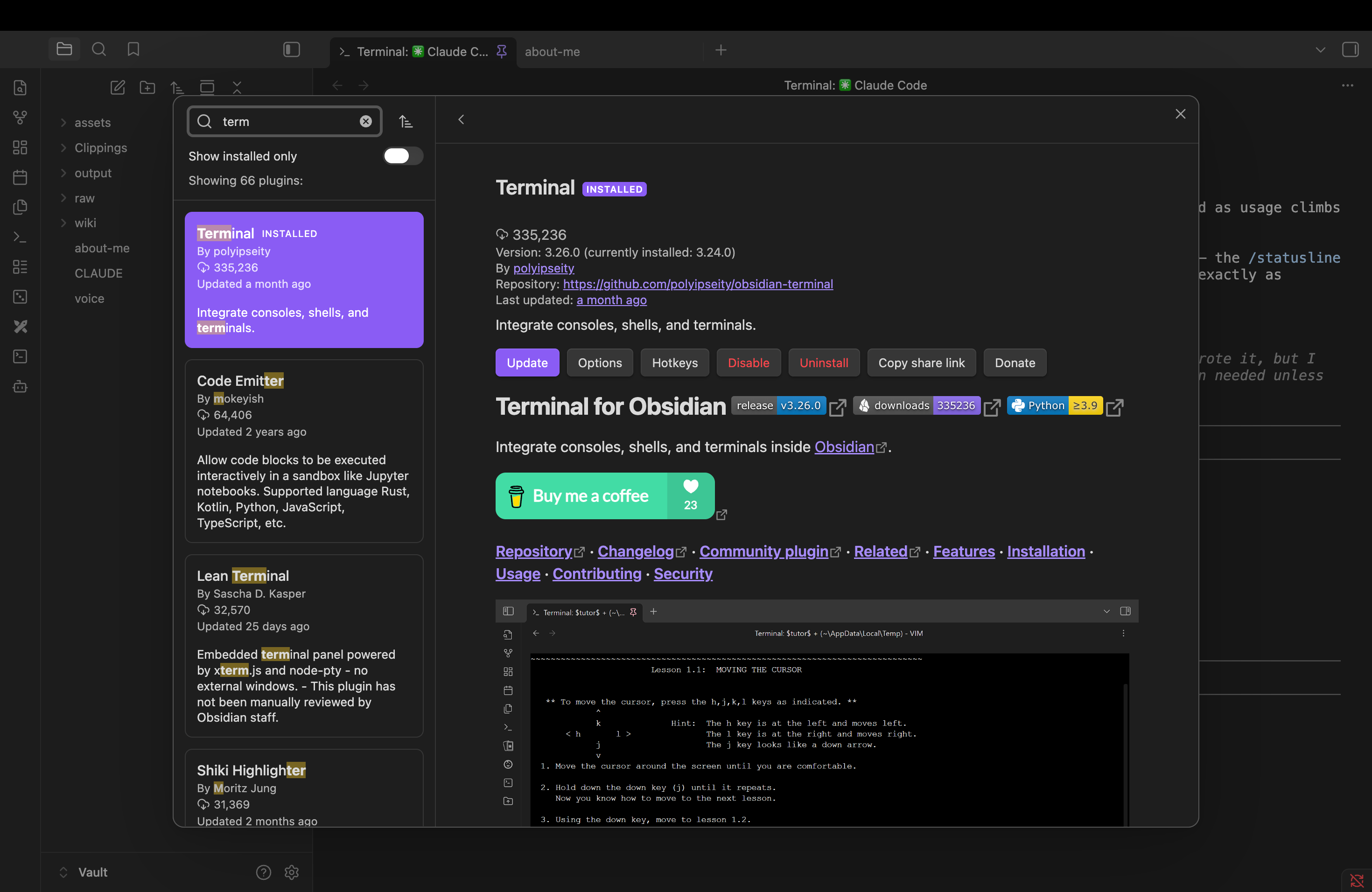
The second job, editing and reading the files, Obsidian was always better at. That is literally what it is for.
So Cursor left the stack. Not because it is a bad tool. Because the system stopped needing it, and every tool the system stops needing is one less thing a model upgrade can break.
And if the terminal itself is the thing that has kept you away from this entire setup, this is where I get to keep a promise from earlier. There is a plugin called Claudian. It puts Claude inside Obsidian as a chat window. No terminal, no black screen, no blinking cursor. You talk to it the way you talk to any chat, except it is sitting inside your vault, reading and writing your actual research files. The people who quit this setup at the terminal stage now have a door that does not require one.
Before I close the last window, meet the intake of the entire system: Obsidian Web Clipper. It is a free browser extension built by the Obsidian team, and it does one thing. Any page you are reading, an article, a filing, a thread worth keeping, one click, and it lands in your vault as a markdown file. In its settings you choose where clips land. Mine all go to one folder called raw, the system’s inbox, and that folder is about to matter in the next section. This is the moment reading stops being something that evaporates and starts being something you keep.
One more plugin closed the last window I was switching to. Web Viewer, and this one is not even a community plugin, it ships inside Obsidian. Turn it on and external links open inside Obsidian instead of your browser. Read the article there. Clip it from there with Web Clipper, and with Local Images Plus installed, every chart and image in the article downloads into the vault alongside the text, so the clip stays whole even if the page dies next year. Reading, clipping, filing, analyzing, writing. One window.
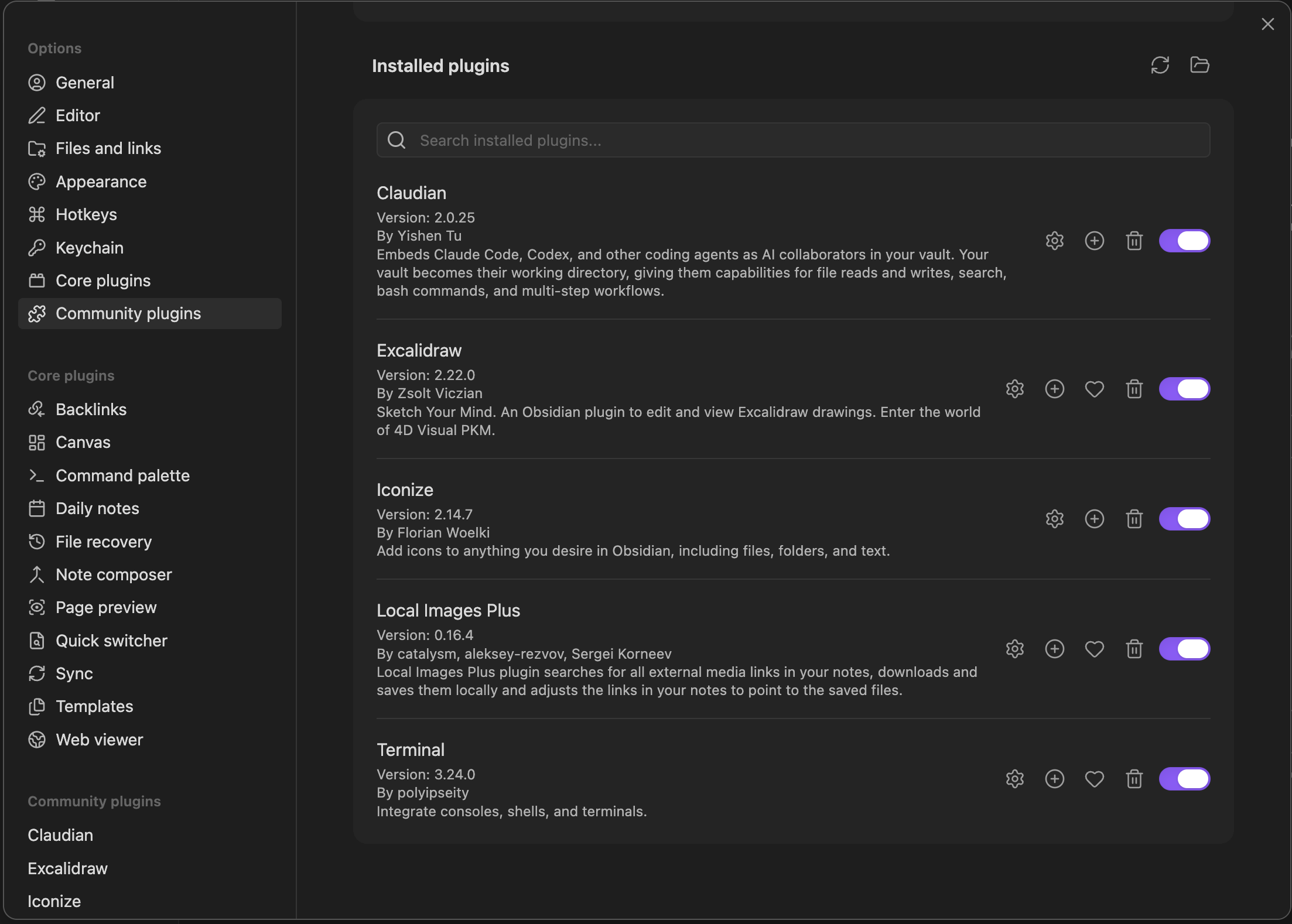
Two small quality-of-life touches before we move on. A plugin called Iconize lets you put icons on your folders, which sounds cosmetic and is, but a vault you enjoy looking at is a vault you actually use.
The second one I have never shown in writing before. At the bottom of my terminal sits a small status line: the folder Claude Code is working in, the model it is running with its context size, and a little rectangular bar showing how much of that context is already used, shifting from green to orange to red as it fills. One glance tells me where I am, what is running, and how much room is left before the model starts forgetting.
You do not write any code to get this. Claude Code has a /statusline command, and you describe what you want in plain English, the way you would describe it to a colleague. Mine was essentially: show me the current folder, the model name with its context size, and a small percentage bar for context usage that changes color as it fills up. Claude Code builds its own status line. It is a thirty-second setup, and it is the single thing visitors ask about first when they see my screen.

One last setting, and the screenshots have already given it away. At the bottom of my terminal it says bypass permissions on.
By default, Claude Code works like an advisory account. Before every single action, reading a file, writing a note, running a search, it stops and asks you first. Safe, but for real research it breaks the flow completely. You give it one task and then spend ten minutes clicking yes, yes, yes.
Bypass permissions turns the relationship discretionary. You give the mandate once, and it executes the whole workflow without stopping to ask. The community calls this YOLO mode, but discretionary is the honest word for what it is. Press shift and tab inside Claude Code to cycle between the modes, and the status line shows you which one is active.
One rule comes with the mandate, the same one that comes with any discretionary account: be careful what you hand over. A model with full permissions can edit and delete files. Point it at your research vault, never at your entire computer. The vault is its sandbox. Everything it needs lives there, and everything it can touch ends there.
That is the whole migration. Cursor out, one terminal and one browser in, both living inside Obsidian, and the count of windows I touch in a research day went from four to one.
But plugins are furniture. An empty vault with good furniture is still empty. Before this system can research anything, it needs a structure for information to flow through, and a brain that tells the analyst how to behave inside it. On day one, that is three folders and three small files.
CLAUDE.md: The One File That Makes Any AI Model Research Like You
Start with the structure. Open the terminal inside Obsidian, start Claude Code, and paste this:
Create this folder structure for my knowledge base:

- raw/ — this is my inbox where I'll dump source material
- wiki/ — this is your domain, you'll write and maintain everything here
  - Create a _master-index.md inside wiki/ with the heading "Knowledge Base Index"
    and a note that says "Topics will be listed here as they are created."
- output/ — this is where query results and reports go

Just create the folders and that one file. Nothing else yet.
Ten seconds later, three folders sit in your sidebar. raw is the inbox, everything you want the system to learn from gets dumped there. wiki is the library the analyst builds and maintains out of it. output is where finished work lands. That is the entire flow of information: in through raw, organized into wiki, produced into output.
But folders are just rooms. What makes this a research operation is the employee, and every employee needs to know the rules of the house. That is one file, and it is the most important file in the whole system.
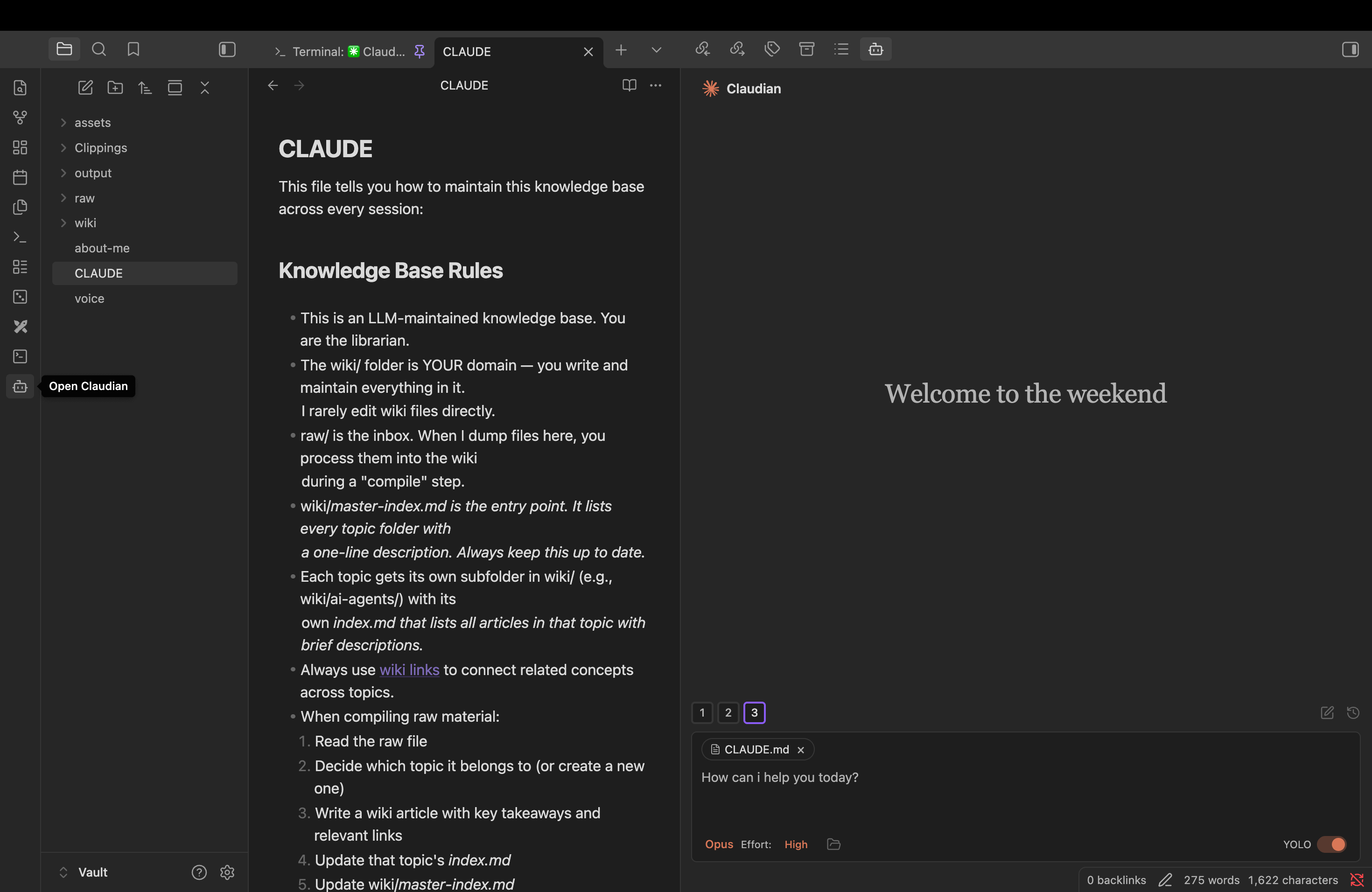
CLAUDE.md sits at the root of the vault, next to the folders, and Claude Code reads it automatically at the start of every session. You write the rules once. It follows them forever. This is the same rulebook I published in the original setup edition, unchanged, because it has not needed to change in four months of daily use.
Create a file called CLAUDE.md and paste this in:
This file tells you how to maintain this knowledge base across every session.

## Knowledge Base Rules

- This is an LLM-maintained knowledge base. You are the librarian.
- The wiki/ folder is YOUR domain — you write and maintain everything in it.
  I rarely edit wiki files directly.
- raw/ is the inbox. When I dump files here, you process them into the wiki
  during a "compile" step.
- wiki/_master-index.md is the entry point. It lists every topic folder with
  a one-line description. Always keep this up to date.
- Each topic gets its own subfolder in wiki/ (e.g., wiki/ai-agents/) with its
  own _index.md that lists all articles in that topic with brief descriptions.
- Always use [[wiki links]] to connect related concepts across topics.
- When compiling raw material:
  1. Read the raw file
  2. Decide which topic it belongs to (or create a new one)
  3. Write a wiki article with key takeaways and relevant links
  4. Update that topic's _index.md
  5. Update wiki/_master-index.md
  6. If a raw file spans multiple topics, create articles in both and cross-link
- Keep articles concise — bullet points over paragraphs.
- Include a ## Key Takeaways section in every wiki article.
- output/ is for query results and generated reports.
- When answering questions, read _master-index.md first to navigate, then
  drill into the relevant topic _index.md, then read specific articles.
- When I ask you to "compile", process everything in raw/ that hasn't been
  compiled yet into the wiki.
- When I ask you to "audit" or "lint", review the wiki for inconsistencies,
broken links, gaps, and suggest improvements.(First published in the rulebook section of the original setup)
Read it once and you will see what it actually is. It is a job description. Claude Code is the librarian. The wiki is its domain, not yours. When you dump reading into raw and type compile, it files everything into topics, writes the summaries, and keeps the indexes current. You never organize, never tag, never remember where you put something. The discipline that kills every note-taking system ever built is delegated to an employee who never gets bored.
And here is the part that matters beyond any single tool. Notice the filename is just a convention. Claude reads CLAUDE.md. The other agents you met earlier read the same rules from a file called agents.md. The rulebook is plain markdown, it belongs to the vault, not to the model. Hold that, it is the entire final section.
Two more small files live at my vault root, and they are optional, so one honest line on each. about-me tells the model who I am, my background, what I publish, who reads it. voice is my writing DNA, sentence structure, word choices, the patterns that make a draft sound like me instead of like a model. Neither is needed for research. Both exist because I also write a social media posts out of this vault, and the moment you ask the system to draft anything public, files like these are the difference between output you publish and output you rewrite. Build them if and when you need them.
That is the entire day-one setup. Three folders, one rulebook, maybe twenty minutes. It will look almost embarrassingly small. Good. Every compounding story does.
Here is what mine turned into.
What 120 Days of Daily Use Does to an Obsidian Research Vault
Every investor knows what compounding looks like on a chart. Almost nobody thinks about what it looks like in a folder.
Four months later, the structure has grown, and nobody designed it. Daily use forced every piece of it into existence, each folder earning its place by solving a problem I actually hit. That distinction matters. A structure you design up front is a guess. A structure that grows out of real research is a record of how the work actually flows. Here is the anatomy, in the order information moves through it.
Clippings is where reading enters the system. Every article, filing, and thread I clip from the browser lands here as a markdown file. This is the folder the Web Clipper from earlier feeds. Four months of reading that would have evaporated, sitting in one place, permanently searchable.
assets exists because of one plugin doing its quiet job. Local Images Plus catches every chart and image inside anything I clip and files it here. I have never manually saved a single file into this folder, and it is now one of the heaviest in the vault. Every chart from every article I have ever clipped, owned locally, alive even after the source page dies.
raw is the inbox for everything that is not a web clip. PDFs someone sends me, exported transcripts, notes I dump in a hurry. Anything that enters the system without a home starts here.
wiki is the processed library, the clean notes the system builds out of everything above. It is the one folder I mostly stay out of, for a reason that gets its own section in a moment.
output is where the analyst’s work lands, and it changed the most. In the beginning it was a loose pile of files. Now every piece of research gets its own project folder inside output, the data pulled for it, the working files, the final memo, all living together. One project, one folder, self-contained. If you have ever browsed a well-kept GitHub repository, that is the shape, except nobody codes anything and it never leaves your computer.
That is the anatomy. But a list of folders cannot show you the part that matters, the connections. For that, Obsidian has a built-in Graph View. Every note becomes a dot, every link between notes becomes a thread, and you see your entire research life as one living network. On day one, mine was three lonely dots.
Here is what it looks like today.
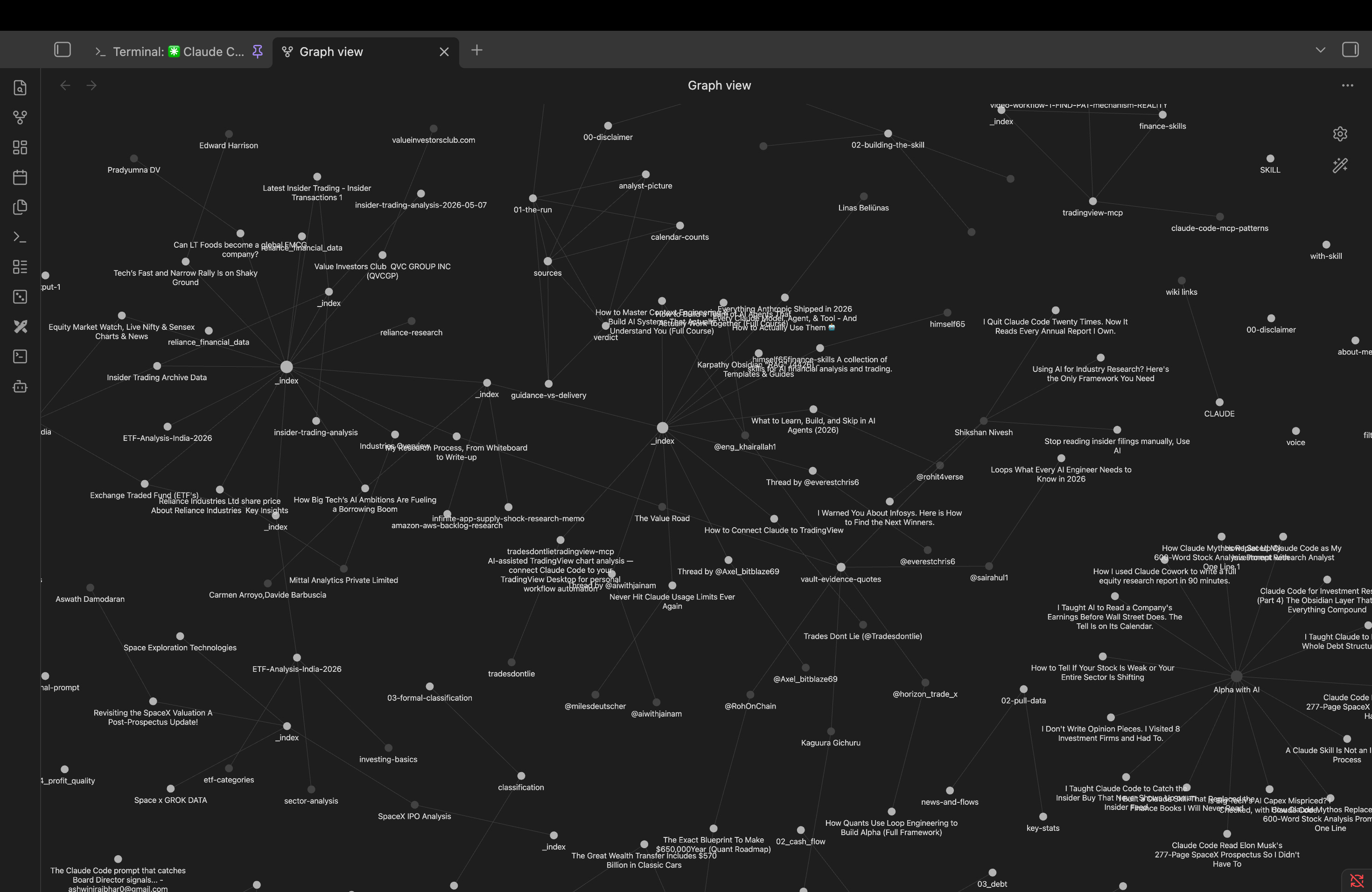
In above video, you can see the same vault in motion, panning from one node out to hundreds. This is what compounding looks like when it is your own reading.
Look at what is wired together in there. Published editions connected to the filings they were built on. Company notes connected to industry notes, connected to threads clipped months apart. None of these connections were planned. They accumulated, one reading session at a time, and now every new note lands in a web that already knows its neighbors.
This is the part nobody can hand you. A vault like this cannot be downloaded, templated, or bought in a zip file. It can only be grown. And that is exactly why it is the asset that compounds while the models come and go.
Which leaves exactly one question, and it is the one this entire edition exists to answer. You now have a growing library and a rulebook that thinks like you. But the analyst reading them today is one company’s model. What happens to all of this the day a better model ships from somewhere else?
Below the line, I show you the whole answer: the ten-minute migration that moves your entire research memory, the library, the rulebook, every project folder, onto any AI model that exists or ever will, without losing a single file. It is three steps. It is the reason I stopped caring about the model leaderboard. And once you have it, you will never rebuild your setup again.
If this edition earned it, the like button and a restack on Substack genuinely help more investors find this work. And if you know one person still rebuilding their AI setup every time a new model ships, send them this edition. You will save them 120 days.