


Every equity research team has a process for analysis.
Almost none of them have a process for memory.
The model gets built. The thesis gets written. The calls get made. But the decisions, why a company got dropped, why the timeline shifted, what the CIO flagged in the last review, those live in someone’s head. Or in a email body nobody can find. Or nowhere at all.
Six weeks into a research project, half the context is gone.
Not because analysts are careless. Because there was never a system to capture it in the first place.
This is the problem Claude Cowork solves, but only if you set it up correctly. Out of the box, Claude has no memory of your project either. Every new session starts blank. You re-explain the coverage universe. You re-brief the thesis. You rebuild what you already built.
The fix is a context system. A set of structured files that Claude reads at the start of every session, updates as decisions get made, and references automatically when something changes.
Four phases. One source of truth. Zero re-explaining.
Here is the full workflow.
The Problem With How Most Teams Use AI
Most finance teams using AI today are getting outputs, not leverage.
Ask a question. Get an answer. Close the tab. Start over tomorrow.
The problem is not the tool. The problem is that every session starts from zero. Claude does not know your coverage universe. It does not know why you dropped that company last week. It does not know what the CIO flagged in the last review. It does not know your thesis shifted.
So you explain it again.
And again next session.
And again the session after that.
You are not building anything. You are running in place with a faster pair of shoes.
The teams getting real leverage are not using Claude to answer questions. They are using it to run projects. Where context compounds. Where a decision made in week two automatically updates the timeline, the risk register, and the stakeholder communications. Where nothing gets lost because everything gets written down in files Claude can actually read.
That is what this workflow builds.
The Four-Phase Workflow
Phase 1 and Phase 2: Building the Foundation
First, the setup.
If you are starting with Claude Projects, create a new Project in Claude and name it after your research report. Upload your initial research notes, any earnings transcripts you already have, and the three skill files from the download bundle at the end of this newsletter.
If you are on Claude Cowork, open the desktop app, click the folder icon, and point it at the project folder on your computer. Claude can now read, create, and edit every file in that folder directly.
Either way, you are ready to start Phase 1.
If you are new to Claude Cowork and want to understand how to select your project folder, navigate the desktop app, and set it up specifically for equity research, read this first: [link to your our previous newsletter]. Come back here once you are set up.
Phase 1: Project Intelligence
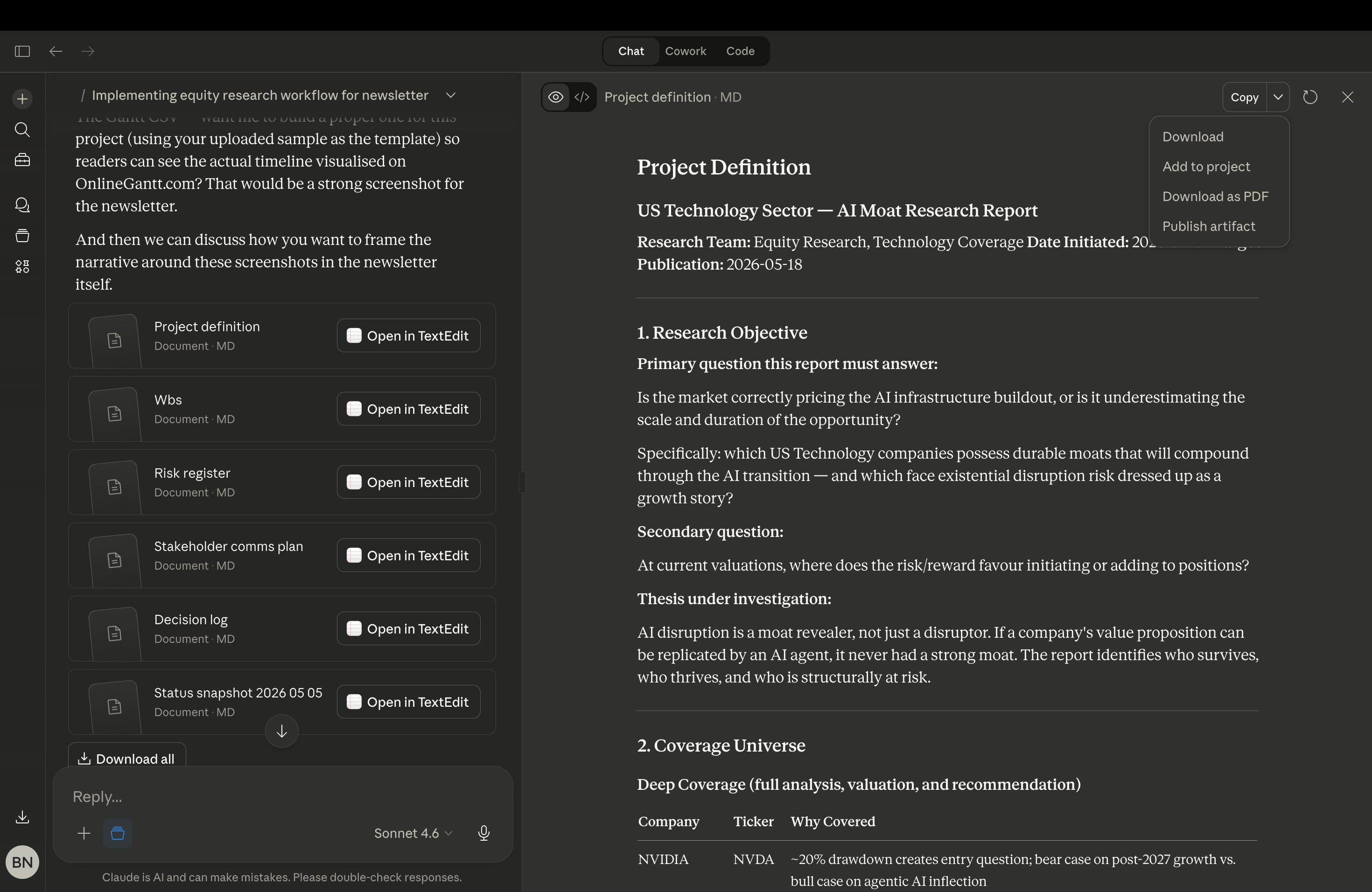
This is the most important phase in the entire workflow. Before you plan anything, you teach Claude everything about the project.
Everything that follows- the plan, the risk register, the stakeholder communications is built from one file:
project-definition.mdIf this file is thorough, every session after it gets easier. If you rush it, you rebuild context forever. Run this prompt to start the discovery session:
You are an expert project manager conducting comprehensive discovery for an equity research project. Ask me one question at a time. After each response, summarise what you have learned before moving on.

Cover these areas in order:
1. Research objectives — what question must the final report answer?
2. Coverage universe — which companies are covered and why?
3. Stakeholders — who needs this, what does each person need from it, and how do they prefer to receive updates?
4. Deadline structure — milestones from data gathering through to publication.
5. Known risks and data gaps.
6. Historical context from any previous coverage of this sector.

When we are done, save everything as project-definition.md.
Claude will ask you one question at a time. Answer each one specifically. The more detail you give here, the sharper every output that follows will be.
The session takes 30 to 45 minutes if you know your project well.
When it is done, run the premortem prompt immediately, before you move to planning:
Conduct a premortem on this research project. Imagine it is six months from now and the report failed — missed deadlines, wrong thesis, stakeholder alignment broke down. Based on everything you know about this project, what are the most likely failure modes? Rank them by likelihood and impact. Add these to project-definition.md.Research by psychologist Gary Klein shows that imagining failure before it happens increases your ability to identify real risks by roughly 30 percent. This prompt costs you five minutes. It will save you a week.
Phase 2: Structured Architecture
Now you convert the project-definition.md file into a live project plan.
Four artifacts. Four prompts. Run them in sequence.
A. The Work Breakdown Structure
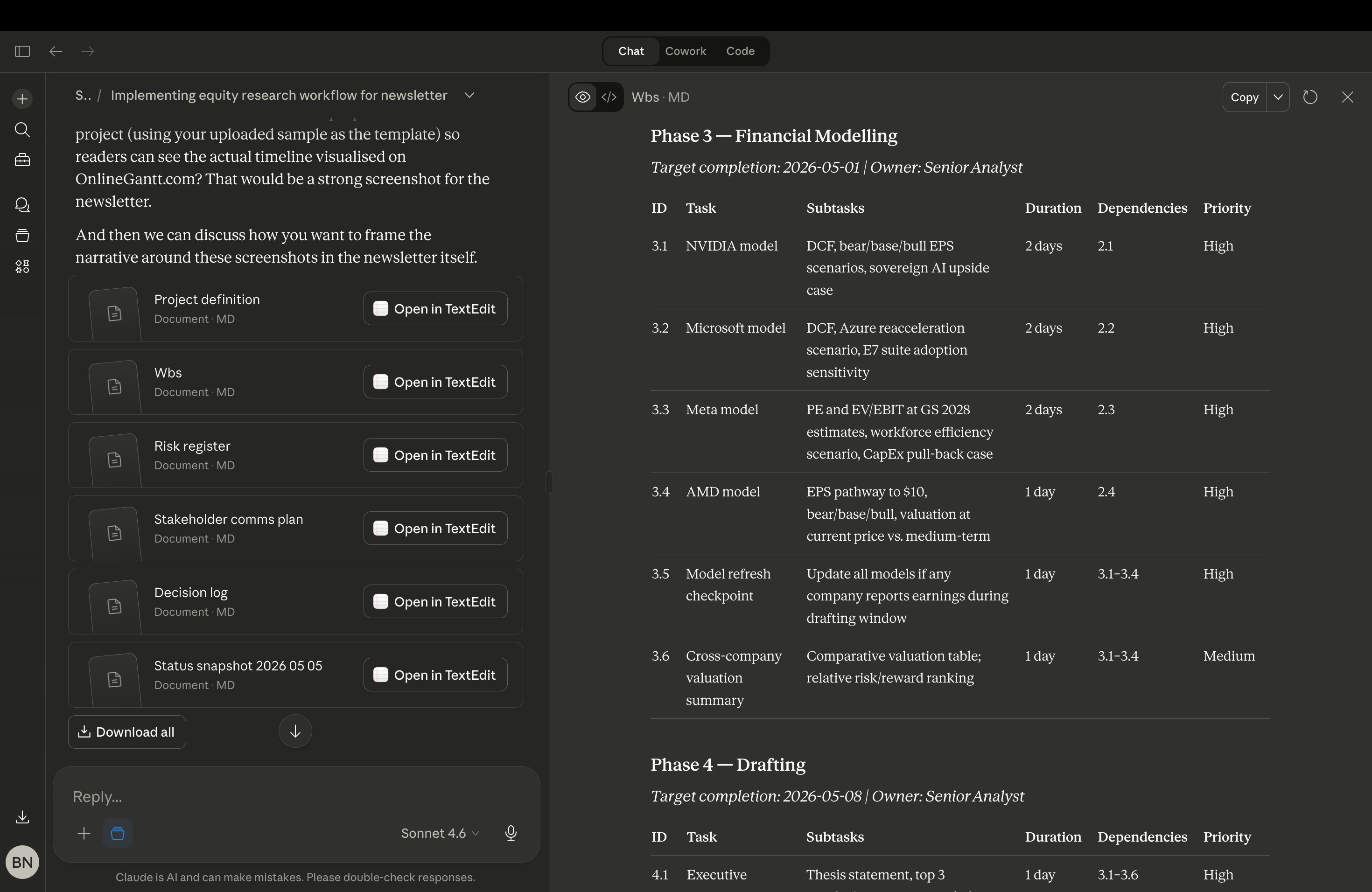
Using project-definition.md, generate a work breakdown structure for this research project. Decompose it into phases (data gathering, analysis, drafting, review, publication), tasks, and subtasks. For each task include: estimated duration, dependencies, responsible party, and priority level. Save as wbs.md.This gives you every task in the project, who owns it, how long it takes, and what it depends on. For a four-company sector report, expect 25 to 35 tasks across five phases.
B. The Risk Register
Convert the premortem risks from project-definition.md into a risk register. For each risk include: description, likelihood (High/Medium/Low), impact (High/Medium/Low), mitigation strategy, owner, and trigger indicators that tell you when to act. Save as risk-register.md.The trigger indicators are the most important column. They tell you exactly what to watch for, so risks don’t surprise you, they get flagged before they land.
C. The Stakeholder Communications Plan
Using the stakeholder information from project-definition.md, create a stakeholder communication plan. For each stakeholder define: their information needs, update frequency, preferred format, and trigger events that warrant immediate communication. Save as stakeholder-comms-plan.md.Every stakeholder gets a different update.
The CIO gets 150 words on milestones and risks. The junior analyst gets a numbered task list. The portfolio manager gets recommendations and risk/reward. One prompt. Three individualised communication plans.
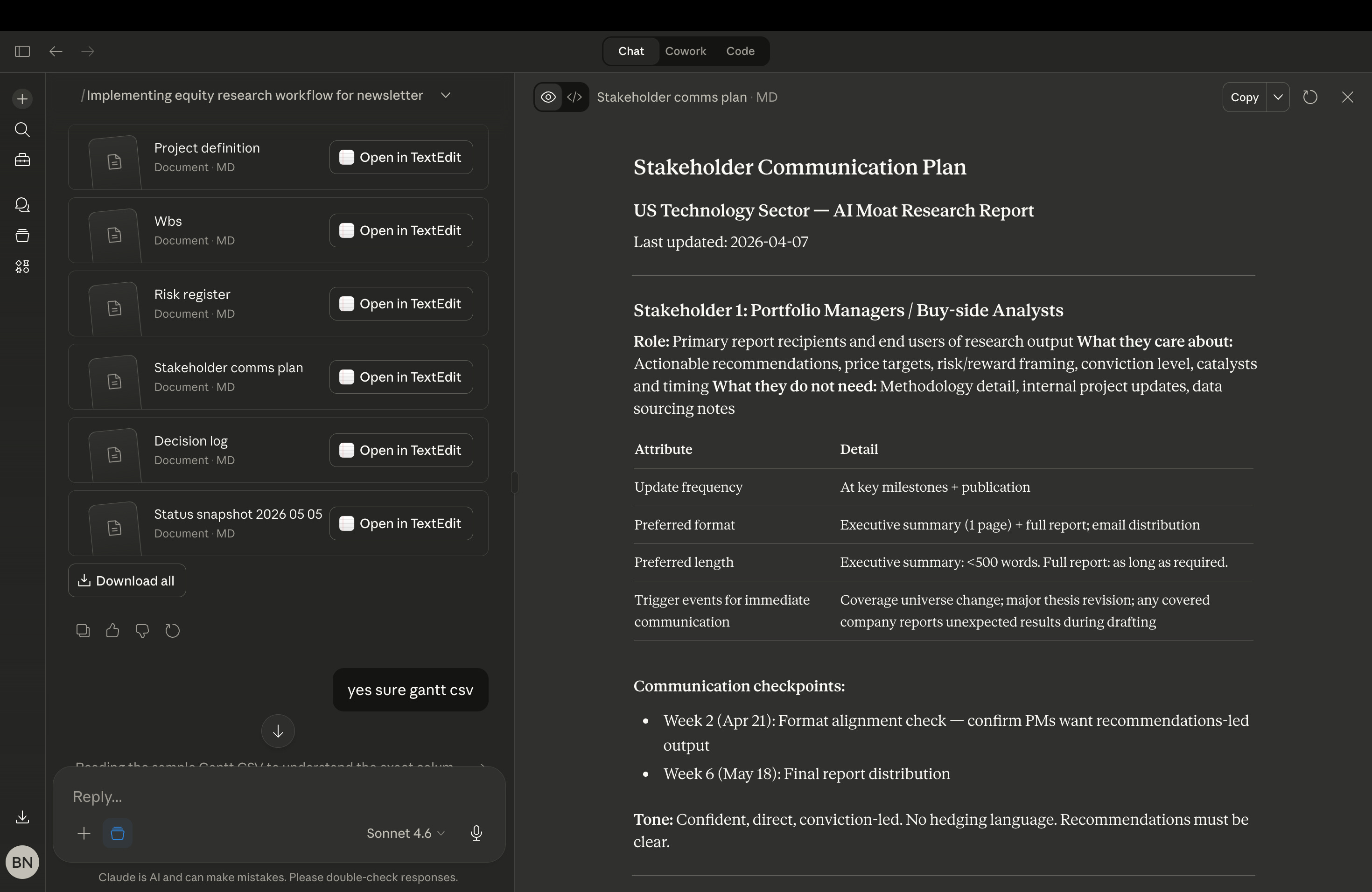
stakeholder-comms-plan.mdD. The Gantt Chart
Generate a Gantt chart for this research project as a CSV file. Use this column format: Outline Level, ID, Name, Start, Finish, Duration, % Complete, Predecessors, Resource Names. Save as gantt-export.csv.Once the CSV is saved, upload it to OnlineGantt.com, free, no account required. You get a full colour-coded visual timeline with dependencies in under two minutes.
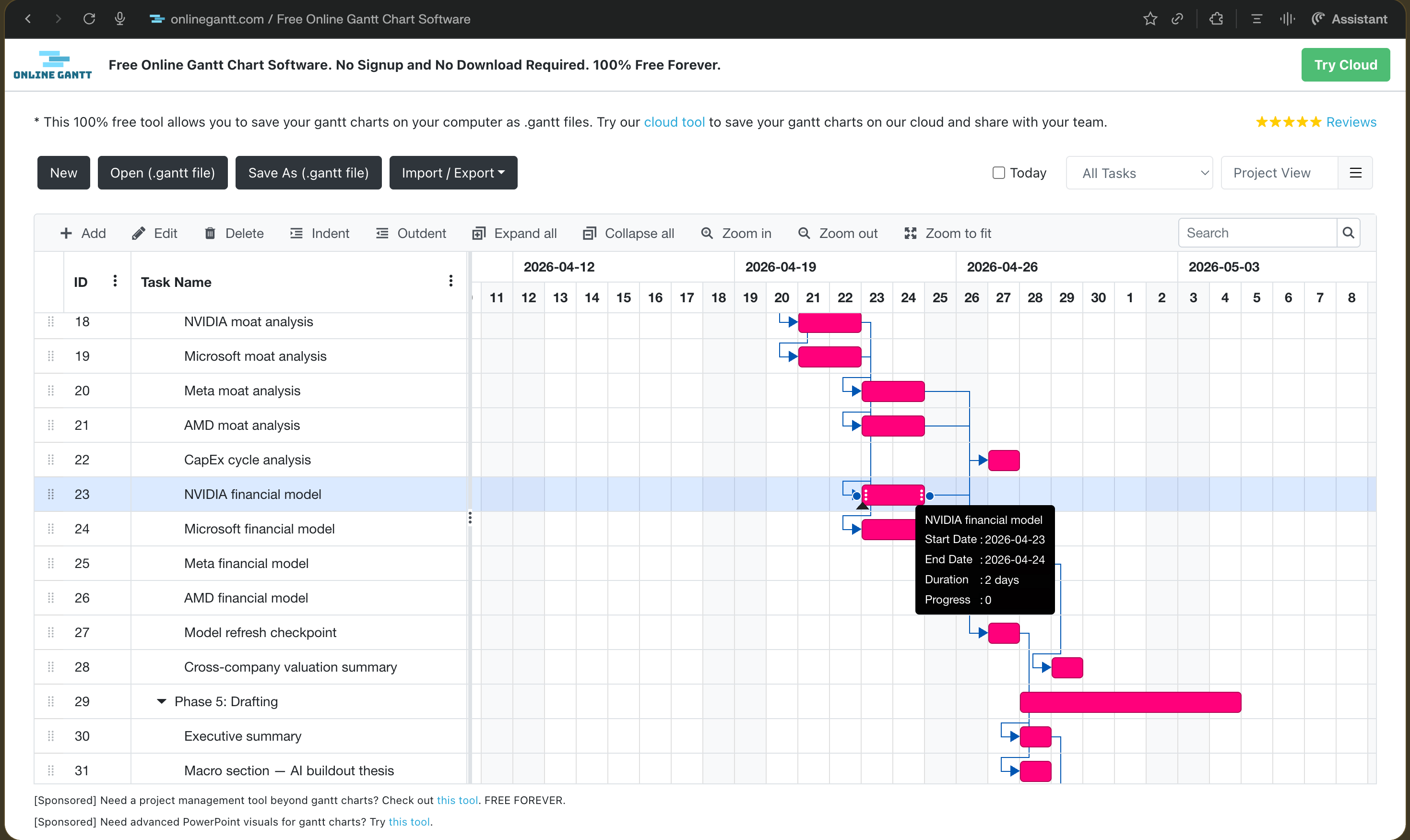
At the end of Phase 2 your project folder looks like this:
research-project/
├── project-definition.md
├── wbs.md
├── risk-register.md
├── stakeholder-comms-plan.md
├── gantt-export.csv
└── skills/
    ├── finance-decision-log-skill.md
    ├── finance-risk-review-skill.md
    └── finance-stakeholder-update-skill.md
One folder. Every file Claude needs to run this project. Always current. Always readable.
The plan is built. Now the project has to survive contact with reality.
Phase 3: When the Project Fights Back
This is where most research projects break down.
Not in the planning. Not in the modelling. In the middle. When something changes and the carefully built plan suddenly has a hole in it.
A company reports earnings during the drafting window. A thesis assumption gets challenged by new data. A coverage decision gets reversed. And suddenly you are manually updating five different documents, re-briefing three different people, and trying to remember what you decided three weeks ago and why.
This is where the context system earns its keep.
Phase 3 is execution. And execution means change. The workflow handles it through three tools- a decision log, a status snapshot, and a risk review, all triggered by single prompts that update the project files automatically.
The Decision Log
Every significant decision gets captured immediately after it is made.
Not batched at end of week. Not summarised from memory. Immediately. Details disappear within 24 hours. A log written on Friday about a decision made on Tuesday is a guess, not a record.
The decision log skill handles this. (download this skill from the download bundle at the end of this newsletter.) If you are on Claude Projects, add the contents of finance-decision-log-skill.md as a Project file. If you are on Claude Cowork, upload the file in a skills subsection inside your customize section, Claude loads it automatically.
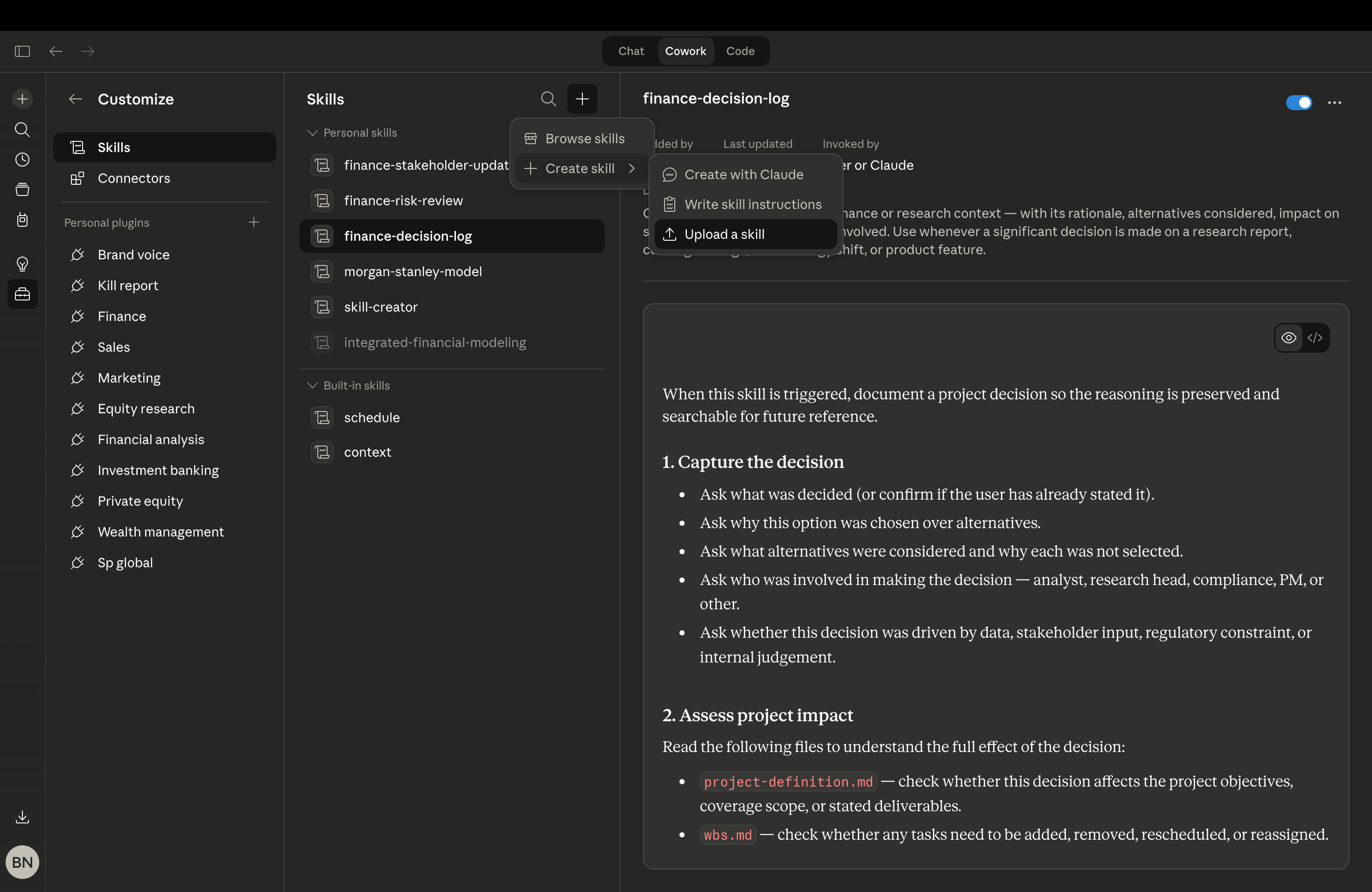
skills subsection inside your customize section, Claude loads it automatically. Then trigger it like this:
Trigger the finance-decision-log skill.

We are dropping [Company X] from the coverage universe. Reason: the most recent earnings call revealed the original thesis no longer holds.

Log this decision, assess the impact on wbs.md and risk-register.md, and draft a brief stakeholder update explaining the change.
Claude reads the project files, identifies every task that referenced that company, assesses the impact on the timeline and risk register, and writes the log entry in a format anyone can read six months from now and understand in under 30 seconds.
The following is an illustrative example, built with real companies and real analytical scenarios so you can see exactly what the system produces. The dates and decisions are mock, the workflow and file structure are exactly what you would be running on your own project.